iPhone · iPad

Full page & long screenshots, stitched in seconds.

FullPage: Long Screenshot is the long screenshot app for iPhone and iPad. Capture a full web page from its link, turn a scrolling screen recording into one image, or stitch overlapping screenshots, then save one seamless PNG, JPG or PDF.

In App Store review · launching soon

One email when FullPage is on the App Store. No spam. Unsubscribe anytime. Privacy

  • Free to start
  • No watermark
  • No account
  • Private, on device
Web pageShare → FullPage
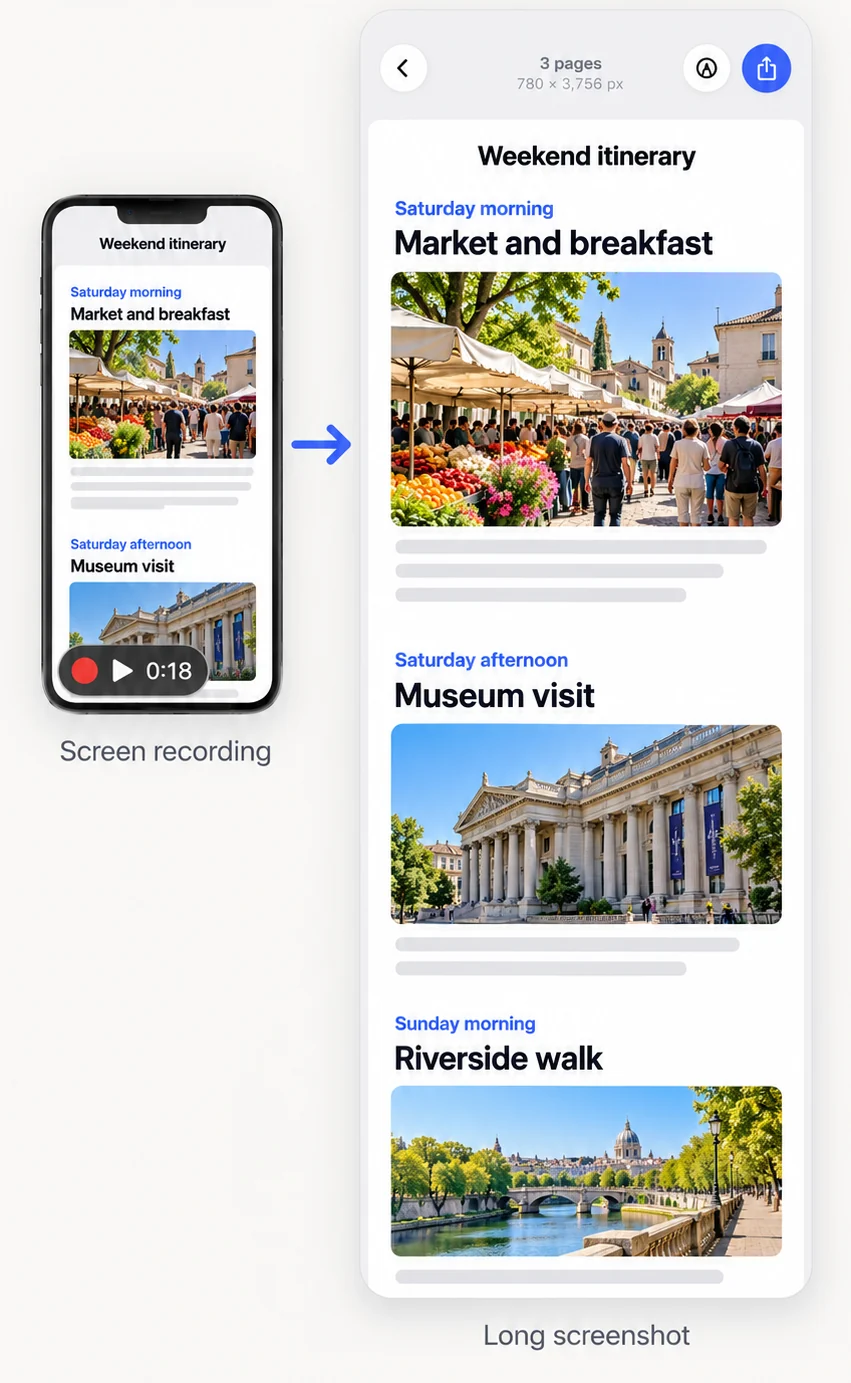
Screen recordingJust scroll
ScreenshotsOverlapping, any app
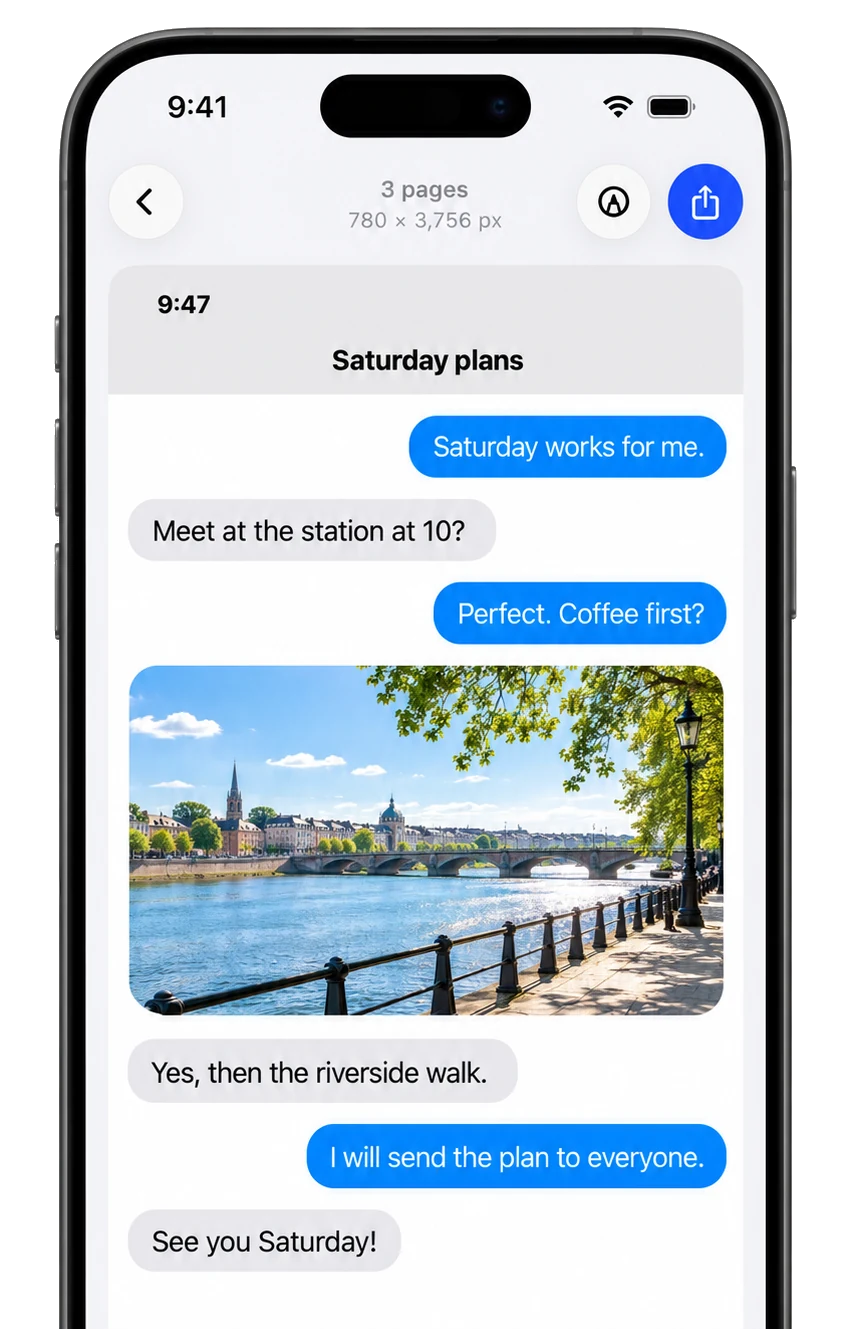
1 long image780 × 3,756 px
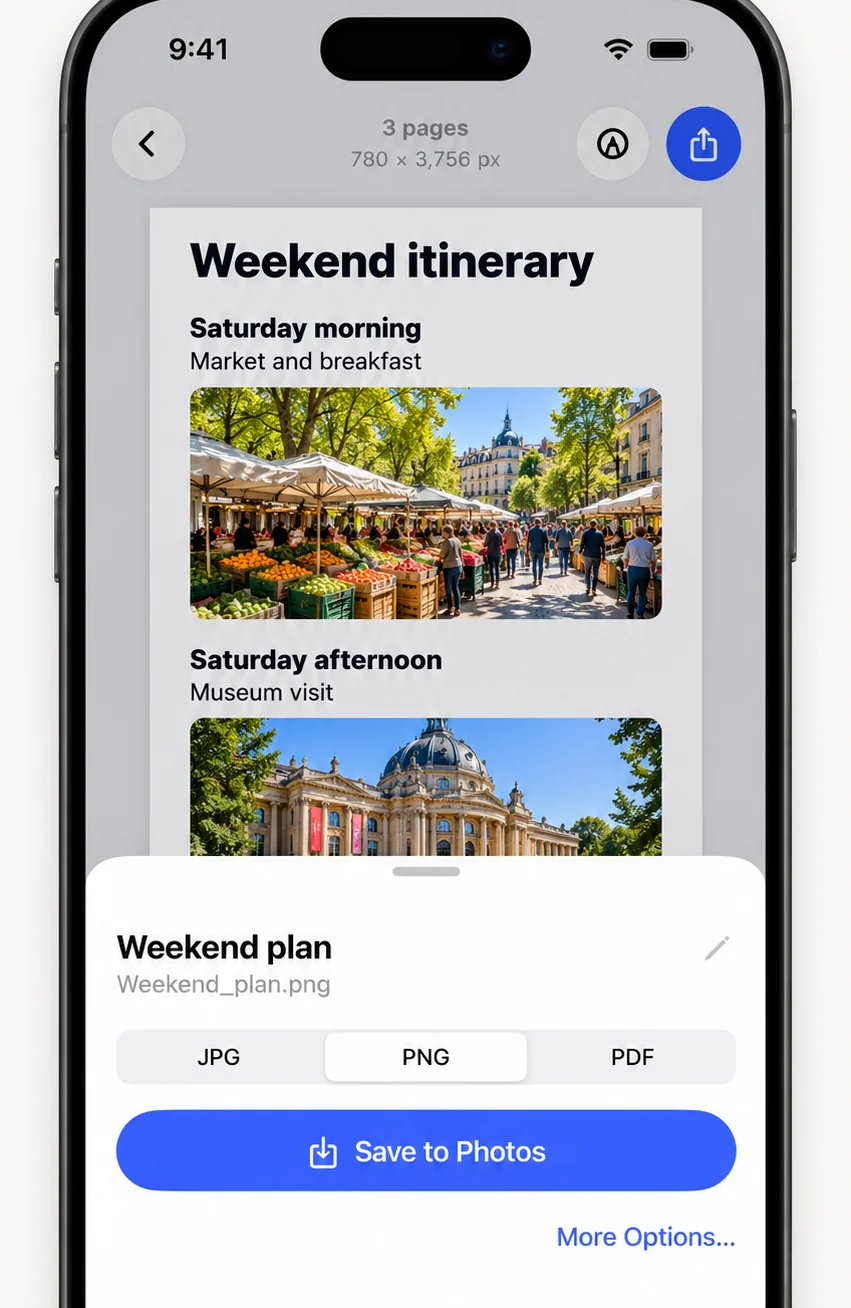
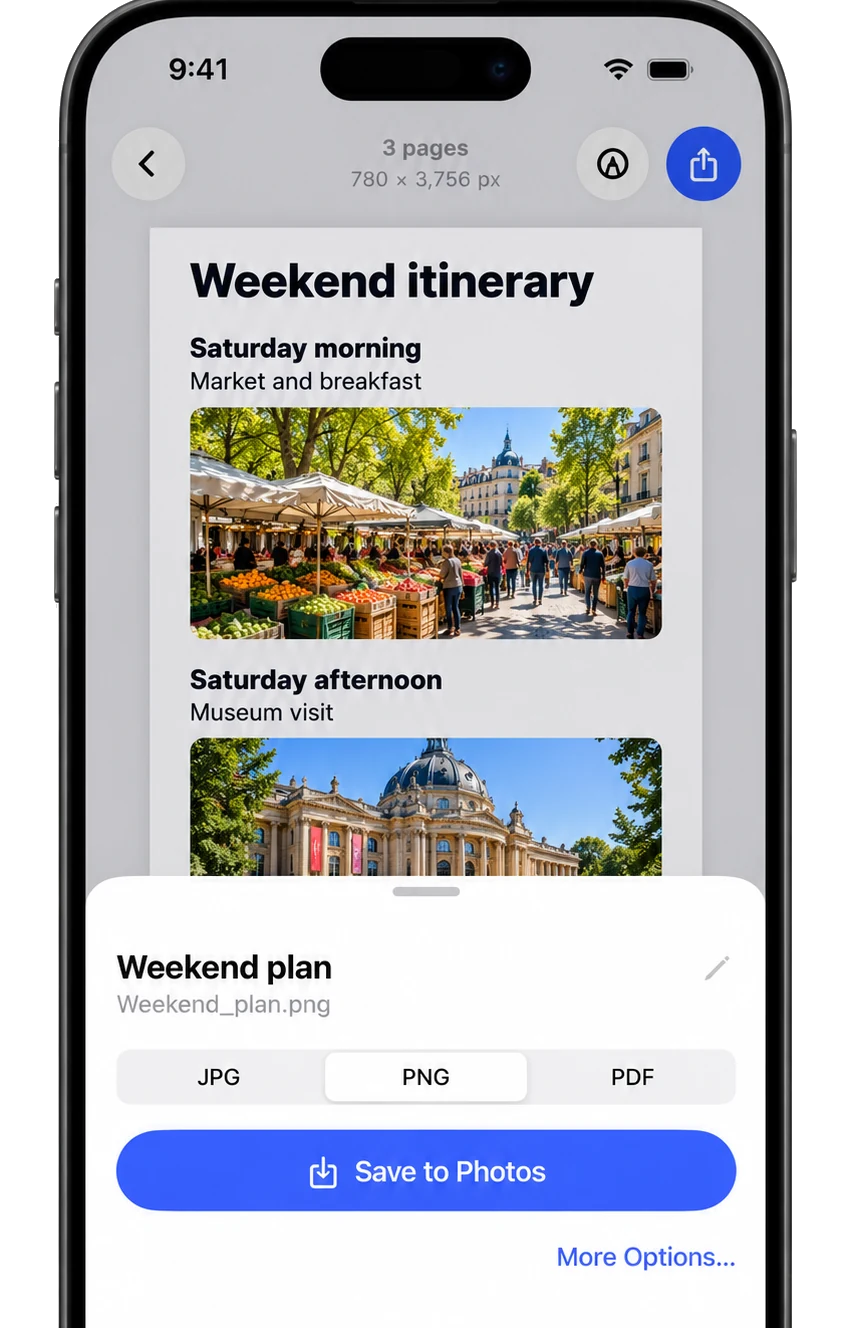
FullPage export sheet saving a long screenshot as PNG, JPG or PDF
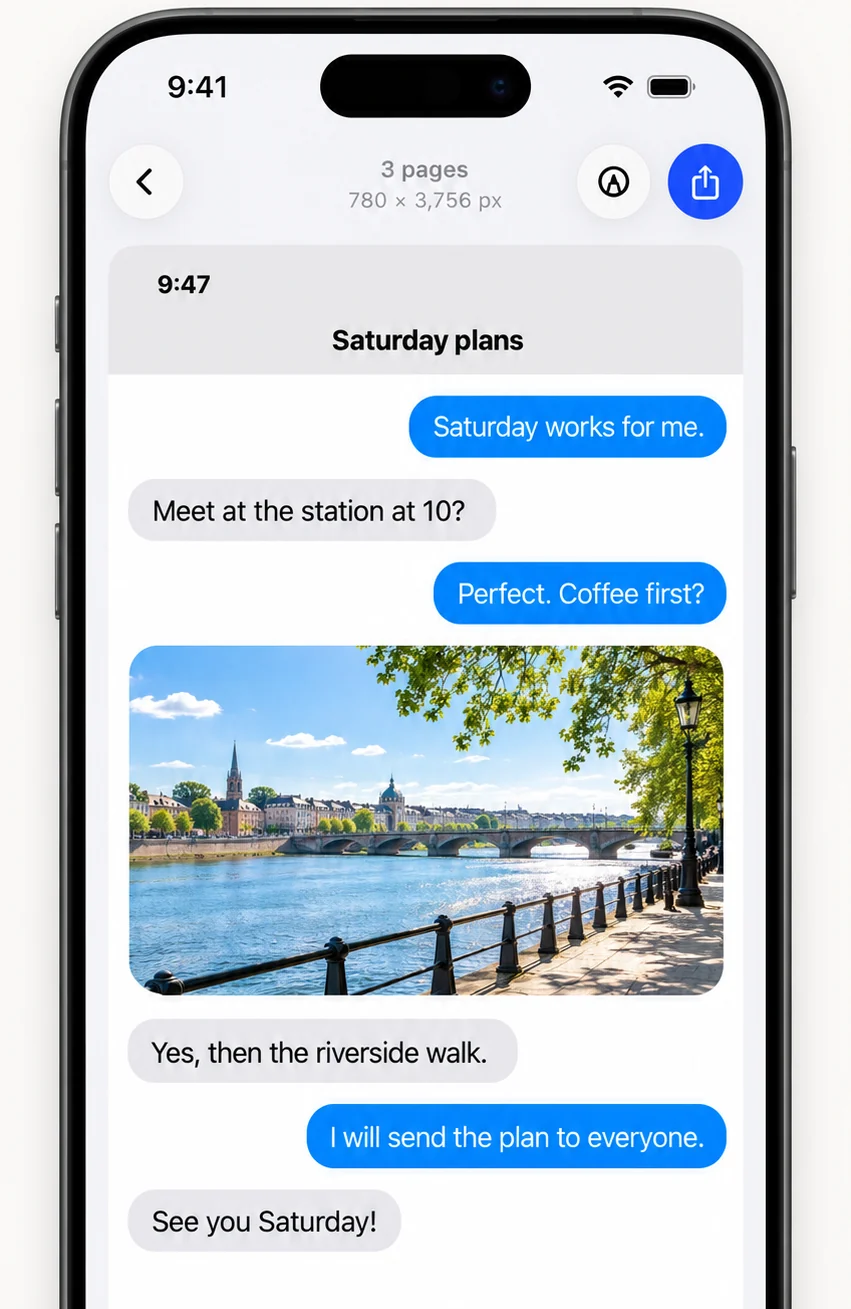
FullPage showing a three page chat stitched into one long screenshot

How screenshot stitching works

Watch overlapping screenshots become one.

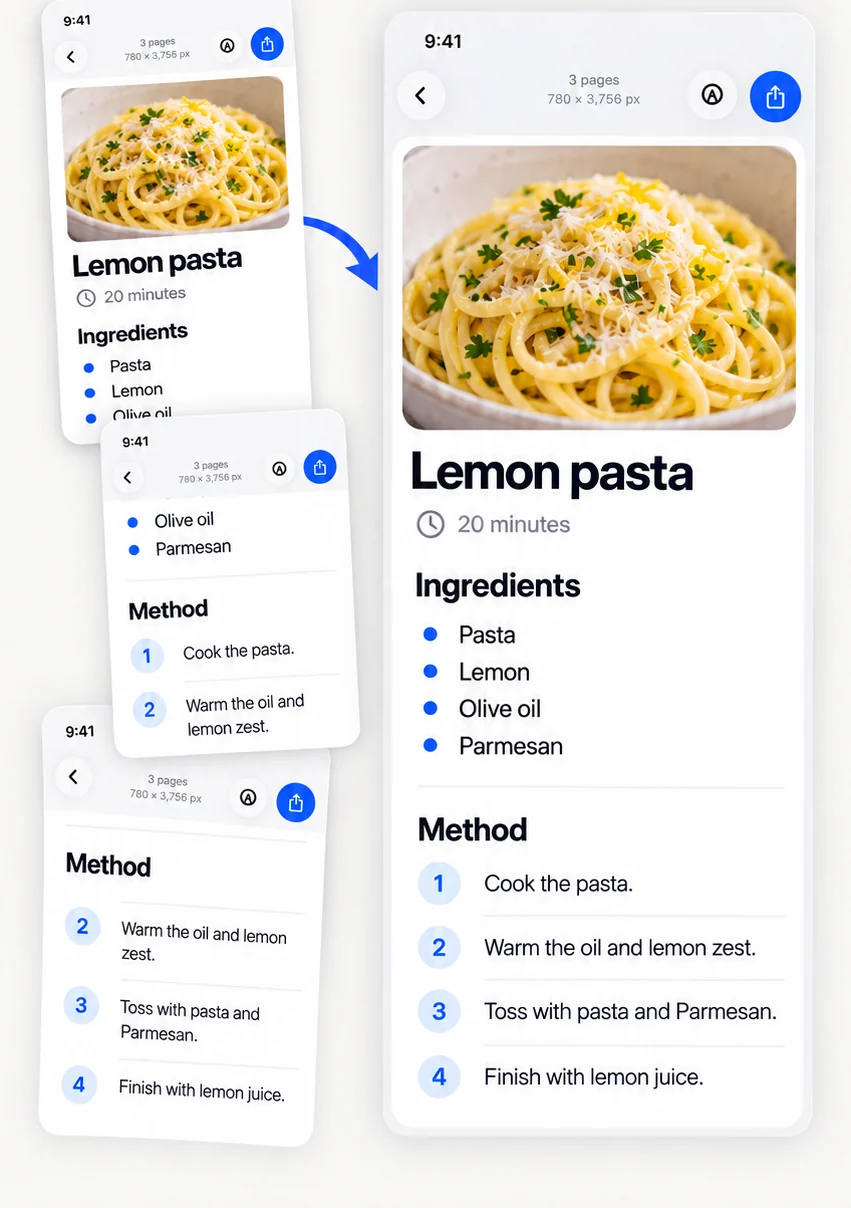
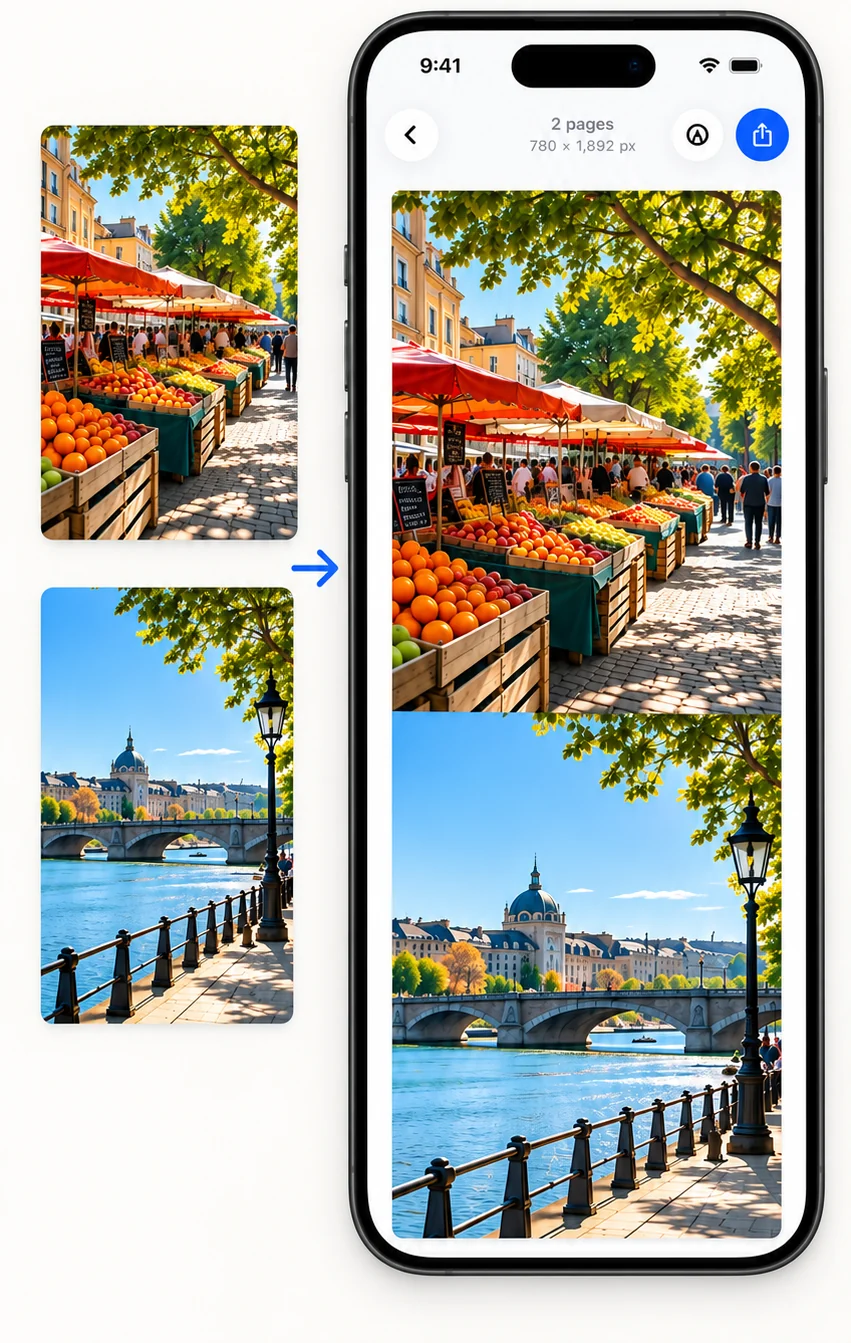
FullPage fingerprints every row of every screenshot, finds exactly where they overlap, and cuts each seam mid-overlap, so nothing repeats and nothing is missing.

  1. Overlapping screenshotsEach one repeats a few rows of the last.
  2. Matching rows foundThe overlap is lined up. Status bars and empty space are ignored.
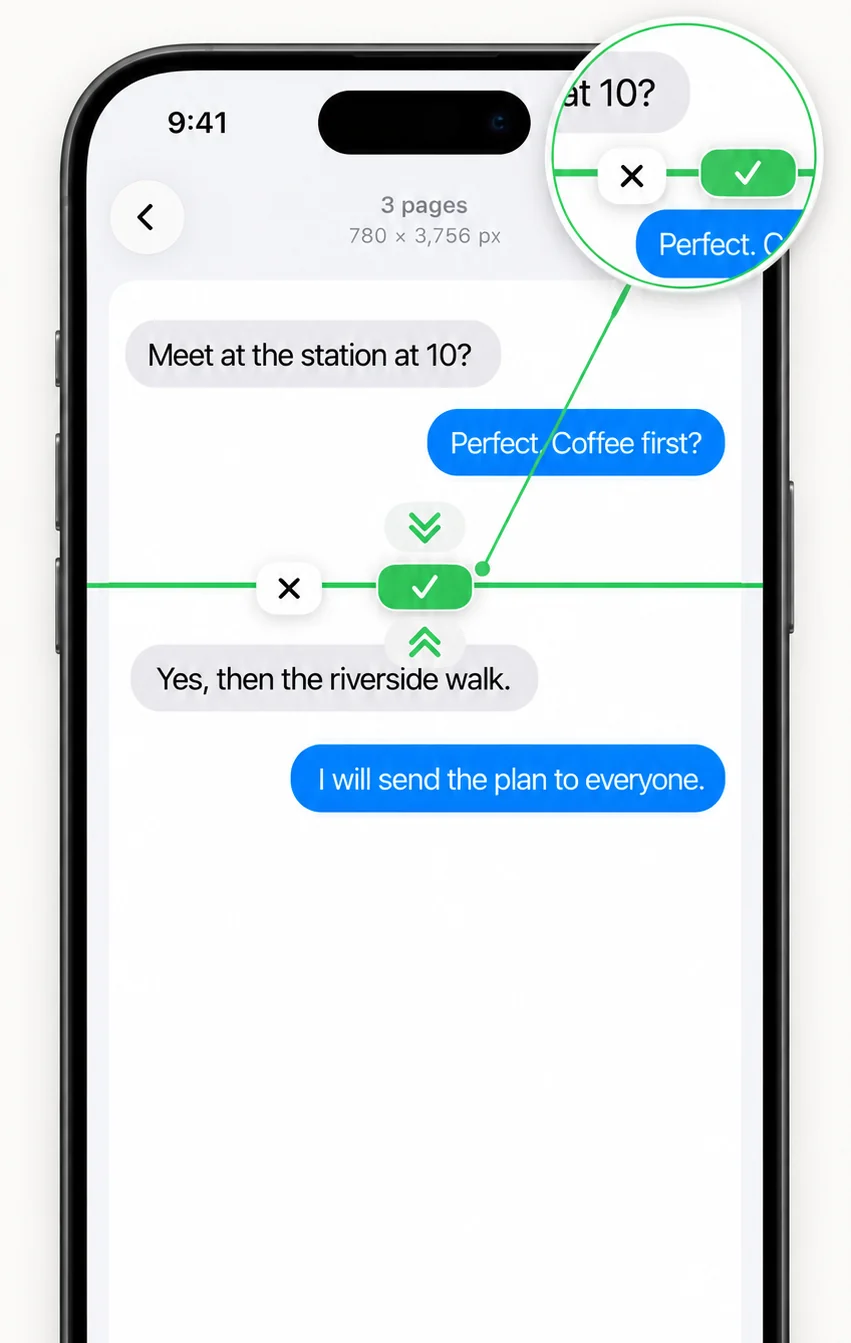
  3. One seamless long screenshotSeams are cut mid-overlap. Adjust any join in a tap.

In the app

A long screenshot editor, not just a stitcher

Stitch, fix, cut, mark up and export, all on your iPhone or iPad.

Use cases

What can you capture as a long screenshot?

Anything that scrolls: keep it whole, in order, in one image.

Features

Seamless by default. Editable when it matters.

Everything a long screenshot needs, from automatic stitching to hiding names before you share.

Automatic, seamless stitching

Matches overlap row by row, keeps status bars once, ignores empty chat space, skips duplicates, and tells you when screenshots do not overlap.

Fix any seam

Nudge or cut where two screenshots meet. Auto Trim switches between whole and trimmed cuts instantly.

Clean web pages

Ads, cookie banners, newsletter pop-ups and app banners are hidden before the page is captured.

Cut Out Part

Size and move a band over anything you do not need, then cut it out of any long image.

Mark up and hide

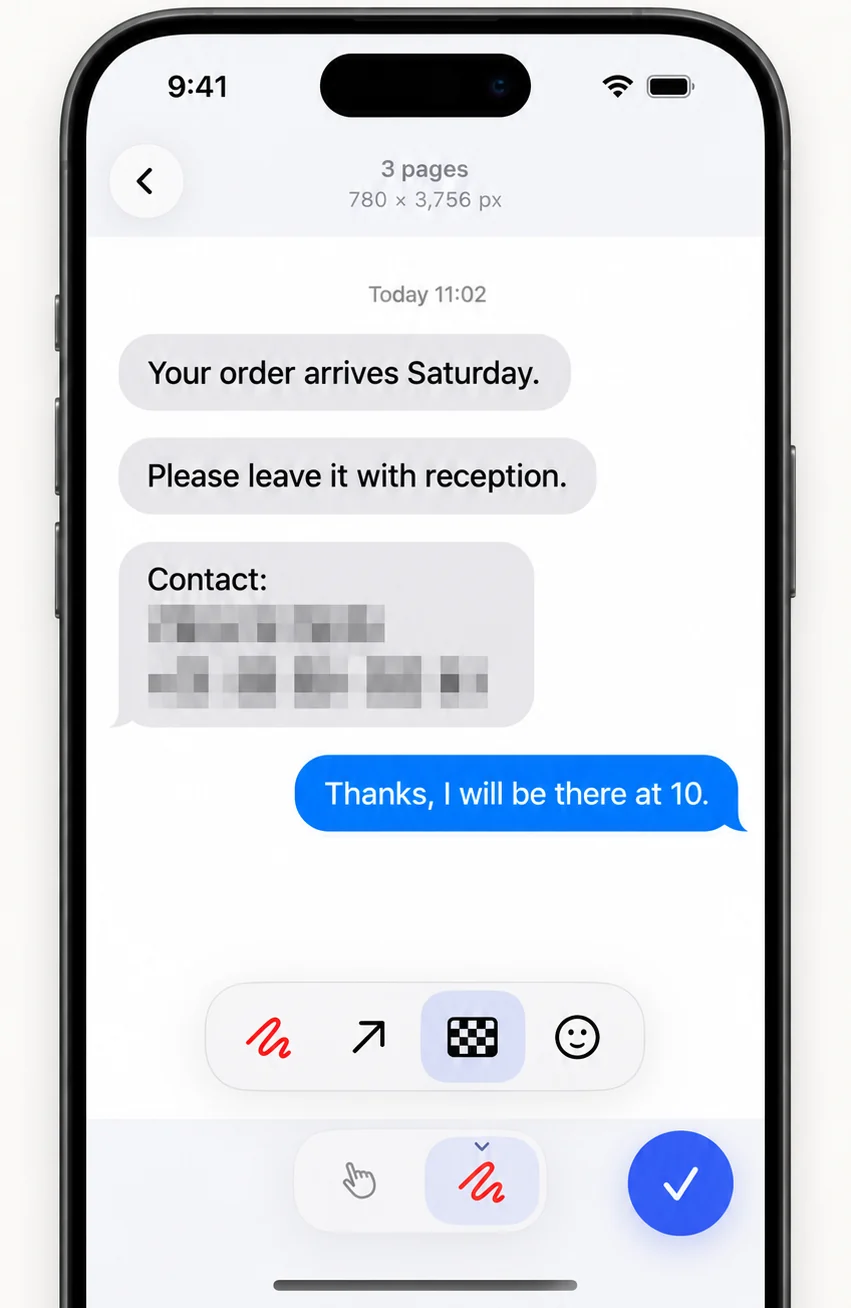
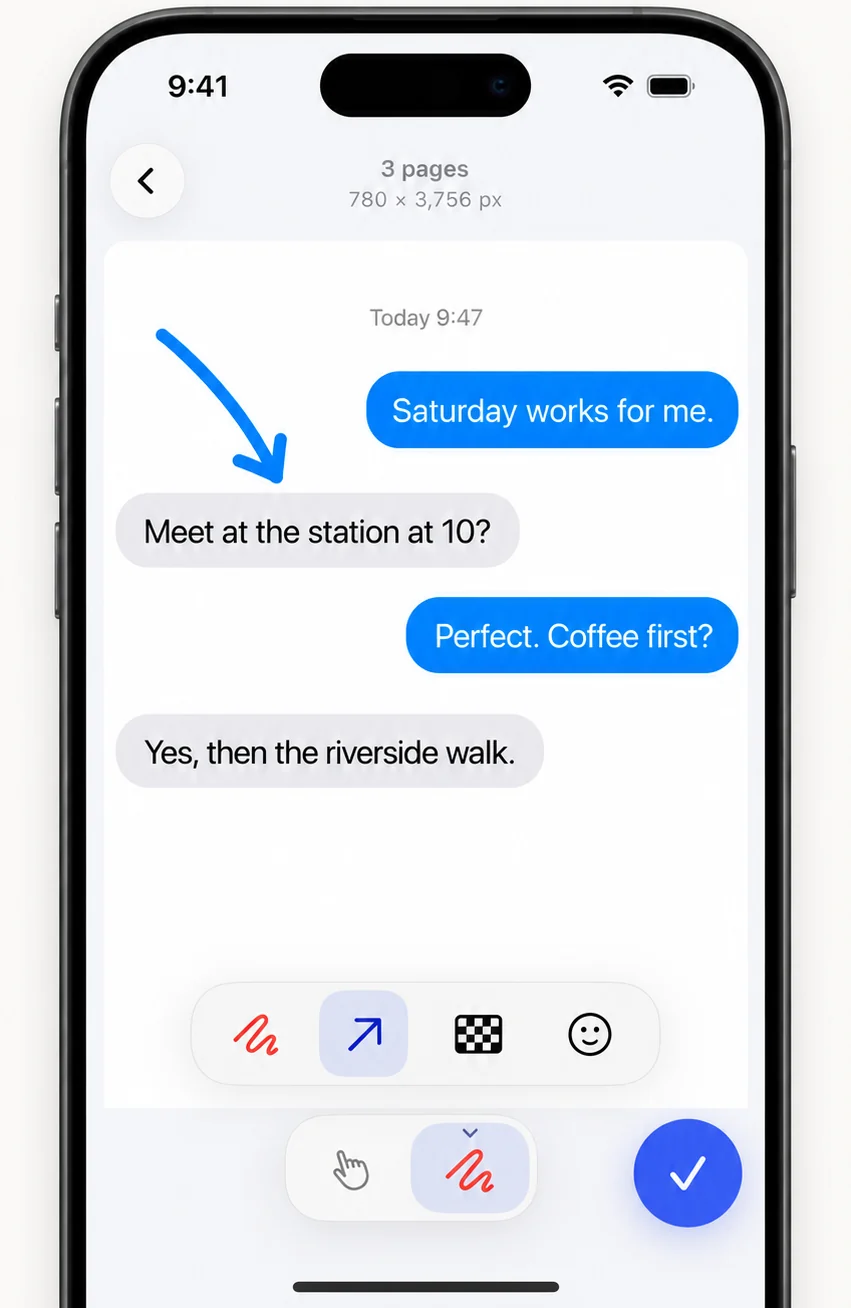
Pen, arrow, mosaic and stickers drawn onto the result. Marks stay editable.

PNG, JPG or PDF

Save to Photos or Files. Web captures include a vector PDF that stays sharp when you zoom.

Recordings, your way

Videos up to 60 seconds stitch automatically. Longer ones open a range picker, and you can add exact frames by hand.

Get FullPage

On your iPhone and iPad

iPhone & iPad app

The complete toolkit. Share a link from Safari, record and scroll, or pick screenshots from Photos, then stitch, fix, mark up and export.

  • Share extension for Safari and any app
  • Stitch screenshots, recordings and photos
  • Export PNG, JPG or PDF
  • Free to start, one-time Pro, no subscription

Choose a method

Which method should I use?

Use the link method for web pages, a recording for anything that scrolls, and screenshots when you already have them.

What you want to captureBest way inYou get
A web page or articleShare the link from Safari to FullPage. Full page screenshotOne tall image plus a vector PDF, ads and pop-ups removed
A chat or app that scrollsScreen-record while you scroll and tap Videos. Scrolling screenshotOne long screenshot stitched from frames
Screenshots you already tookSelect them in Photos, then Share → FullPage. Stitch screenshotsA seamless long image, duplicates skipped
Separate photosPick them with Photos in the app. Stitch photosOne long strip (side-by-side and grid layouts in Pro)

Why an app

Can’t iPhone take a long screenshot on its own?

Only a web page in Safari, and only as a PDF. Here is what FullPage adds.

What you neediPhone on its ownWith FullPage
A whole web pageSafari Full Page saves a PDF only, ads and pop-ups includedPNG, JPG or vector PDF, ads and pop-ups removed
A long chat or any appMany separate screenshots, or a videoOne long screenshot from a recording or screenshots
Screenshots you already tookNo way to join themStitched automatically, overlap and duplicates removed
Hiding private detailsMarkup pen and shapesMosaic, stickers, pen, arrow and Cut Out Part

At a glance

FullPage: Long Screenshot at a glance

Availability
In App Store review, launching soon. Join the launch list for one email when it is live
What it is
A long screenshot app and screenshot stitcher for iPhone and iPad
Best for
Whole chats, full web pages, articles, recipes, receipts, order histories, settings and any screen that scrolls
Three ways in
Share a web page link · Screen-record while you scroll · Pick overlapping screenshots or photos
Output
One long PNG, JPG or PDF (web pages also get a vector PDF), saved to Photos or Files
Web pages
Full page captured from the link, with ads, cookie banners and pop-ups hidden
Price
Free: up to 10 screenshots per stitch, no watermark. Pro: one-time US$3.99, no subscription
Privacy
Processed on your device. No account, no analytics, nothing uploaded to us
Requires
iOS 18.0 or later on iPhone and iPad
Not for
Photo collages, panoramas, or recording your screen (use iOS Screen Recording, then open the video in FullPage)
FAQ

Long screenshot questions, answered

When can I download FullPage?

FullPage is in App Store review and launching soon. Leave your email on this page and we will send one message when it is available on the App Store.

What is FullPage: Long Screenshot?

FullPage: Long Screenshot is an iPhone and iPad app that makes one long screenshot from a web page link, a scrolling screen recording or overlapping screenshots, and saves it as PNG, JPG or PDF. It is free to start, works on your device, and needs no account.

Does iPhone have a built-in scrolling screenshot?

Only for some pages. In Safari and a few other apps, you can take a screenshot, tap the preview, choose Full Page and save it as a PDF to Files. It does not work in chat apps or most other apps, and it cannot save an image. For anything else you need a long screenshot app such as FullPage.

How do I take a long screenshot on iPhone?

With FullPage there are three ways. Share a web page link from Safari to FullPage. Or screen-record while you scroll any app, then open the video in FullPage. Or take overlapping screenshots and stitch them. Each way ends in one long image you can save as PNG, JPG or PDF.

How do I screenshot an entire web page on iPhone or iPad?

Open the page in Safari, tap Share, choose FullPage, then tap Save. FullPage loads the whole page, hides ads, cookie banners and pop-ups, and saves it as one tall PNG or JPG plus a vector PDF.

How do I combine multiple screenshots into one image?

Take screenshots that overlap by at least 10 percent, select them in Photos, tap Share and choose FullPage. It finds the overlap, keeps the status bar once, skips duplicates and joins (stitches, merges) them into one seamless image.

How do I screenshot a whole conversation?

Scroll to the start of the chat, then either take overlapping screenshots as you scroll or screen-record one slow scroll. Open them in FullPage and it stitches the messages into one image. Cover names and numbers with mosaic (Pro) before you share.

Can I turn a screen recording into a long screenshot?

Yes. Record your screen while you scroll, then open the video in FullPage. Videos up to 60 seconds are stitched automatically; for longer videos you choose a 60-second range. You can also add exact frames by hand.

What makes FullPage different from other long screenshot apps?

FullPage combines all three ways in one app: a full page capture straight from a link, with ads and pop-ups removed and a vector PDF; screen recording to long screenshot with a frame picker; and automatic screenshot stitching. The free version adds no watermark, and Pro is a one-time purchase instead of a subscription.

Is FullPage free?

Yes, FullPage is free to start: stitch up to 10 screenshots at a time with no watermark. FullPage Pro is a one-time purchase (US$3.99 in the US) that unlocks unlimited screenshots per stitch, side-by-side and grid layouts, mosaic and stickers. There is no subscription.

Does FullPage upload my screenshots?

No. Stitching, editing and web page rendering happen on your device. FullPage has no account, no analytics and no server that receives your content.

Does FullPage work on iPad?

Yes. FullPage is built for iPhone and iPad and requires iOS 18.0 or later.

What file formats can I export?

PNG, JPG or PDF, saved to Photos or the Files app or shared to any app. Web page captures also include a vector PDF that stays sharp when you zoom.

Is FullPage a collage or panorama app?

No. FullPage makes long vertical images from screens that scroll. For photo collages or panoramas, use a dedicated collage or panorama app.

FullPage app icon

In App Store review · launching soon

Be first to stop stitching by hand.

Leave your email and we will send one message the day FullPage is on the App Store.

One email when FullPage is on the App Store. No spam. Unsubscribe anytime. Privacy